Publishing Axis AOA Counters over LoRaWAN
Axis cameras running Axis Object Analytics can count people, vehicles, and other objects with high accuracy — but getting those counts out of a remote or network-constrained site has always been a friction point. This article shows how to bridge that gap using the AI-B100 LoRaWAN Bridge from AI Embedded Nordic and a dedicated ACAP, sending live counter data over LoRaWAN without any internet connection or cloud subscription.
Get Started
- AI-B100 AOA Counter ACAP — source code on GitHub
- AI-B100 hardware — contact ai-b100@ai-embedded.se or visit www.ai-embedded.se
Why LoRaWAN?
LoRa (Long Range) is a radio modulation technology developed by Semtech. It uses a spread-spectrum technique to achieve remarkable range — several kilometres in open terrain, hundreds of metres in dense urban or indoor environments — while consuming very little power. A LoRa radio can run on a small battery for years.
LoRaWAN is the network protocol built on top of LoRa. It defines how devices communicate with gateways, how gateways forward data to a network server, and how the network server routes messages to your application. It is an open standard managed by the LoRa Alliance and is widely supported by platforms such as The Things Network (TTN), Chirpstack, and many private deployments.
Together, LoRa + LoRaWAN give you a long-range, low-power, low-cost radio network — perfect for sending small, periodic data packets from sites where running Ethernet or 4G/5G is impractical or expensive. A single gateway can cover several kilometres, and the network supports thousands of devices simultaneously.
For an Axis camera running Axis Object Analytics, the data payload is tiny: a handful of integer counts per publish interval. LoRaWAN handles this effortlessly, and the entire pipeline — from camera inference to cloud backend — can operate fully offline at the installation site.
Key advantages for this use case:
- No internet connection required at the camera site
- GDPR-compliant: only anonymized numeric counts leave the camera, never images
- Works with any standard LoRaWAN network server (TTN, Chirpstack, private servers)
- Long range — one gateway covers an entire building or outdoor area
Hardware Required
| Component | Purpose |
|---|---|
| Axis camera (ACAP + AOA capable) | Edge inference and counting |
| AI-B100 LoRaWAN Bridge | Bridges MQTT to LoRaWAN radio |
| PoE Switch (e.g. Netgear GS305EPP) | Powers camera and provides LAN |
| LoRaWAN gateway | Receives radio uplinks |
Software Required
AI-B100 AOA Counter ACAP — source code on GitHub
The AI-B100 AOA Counter ACAP runs on the Axis camera. It:
- Reads CrosslineCounting events from Axis Object Analytics
- Aggregates counts by object class (humans, cars, bikes, buses, trucks, other vehicles)
- Publishes compact binary payloads via AI-B100
- Respects LoRaWAN duty cycles through a configurable publish interval (minimum 10–15 minutes recommended)
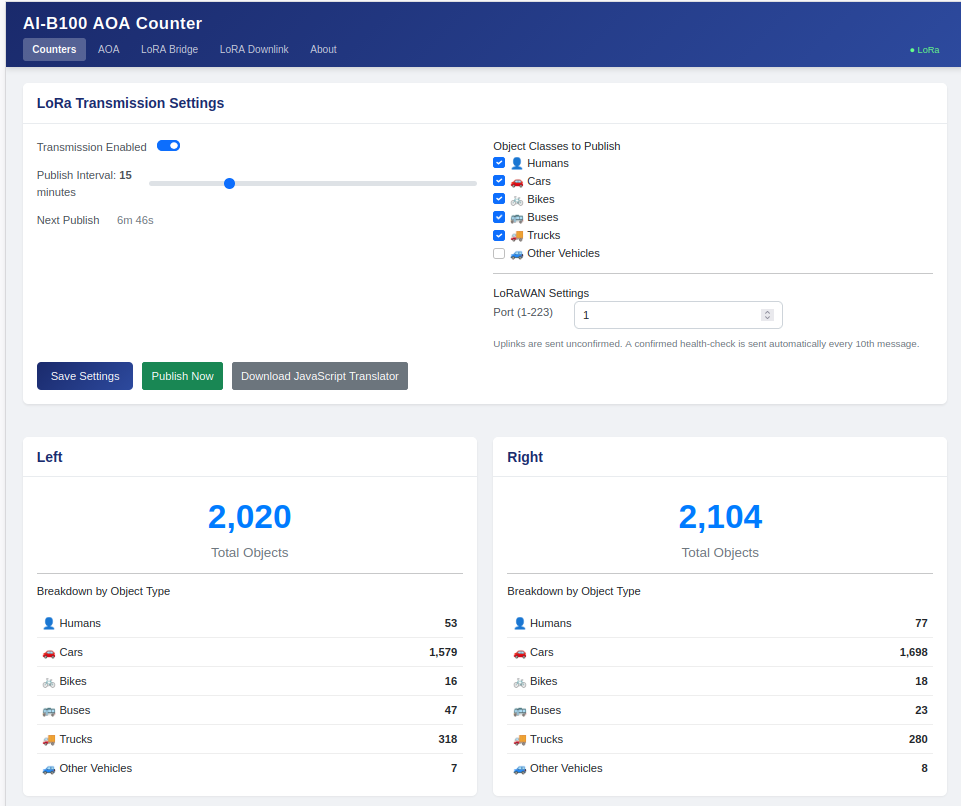
The ACAP settings page lets you:
- Set the publish interval (default: 15 minutes)
- Choose which object classes to include in each uplink
- View live running totals for Left and Right counting directions
- Publish Now to send an immediate uplink for testing
- Download JavaScript Translator — a ready-made payload decoder for your LoRaWAN network server
Uplinks are sent unconfirmed. A confirmed health-check is sent automatically every 10th message to verify the link is alive without consuming duty cycle unnecessarily.
Configuring Axis Object Analytics
Before installing the ACAP, set up a CrosslineCounting scenario in Axis Object Analytics on the camera.
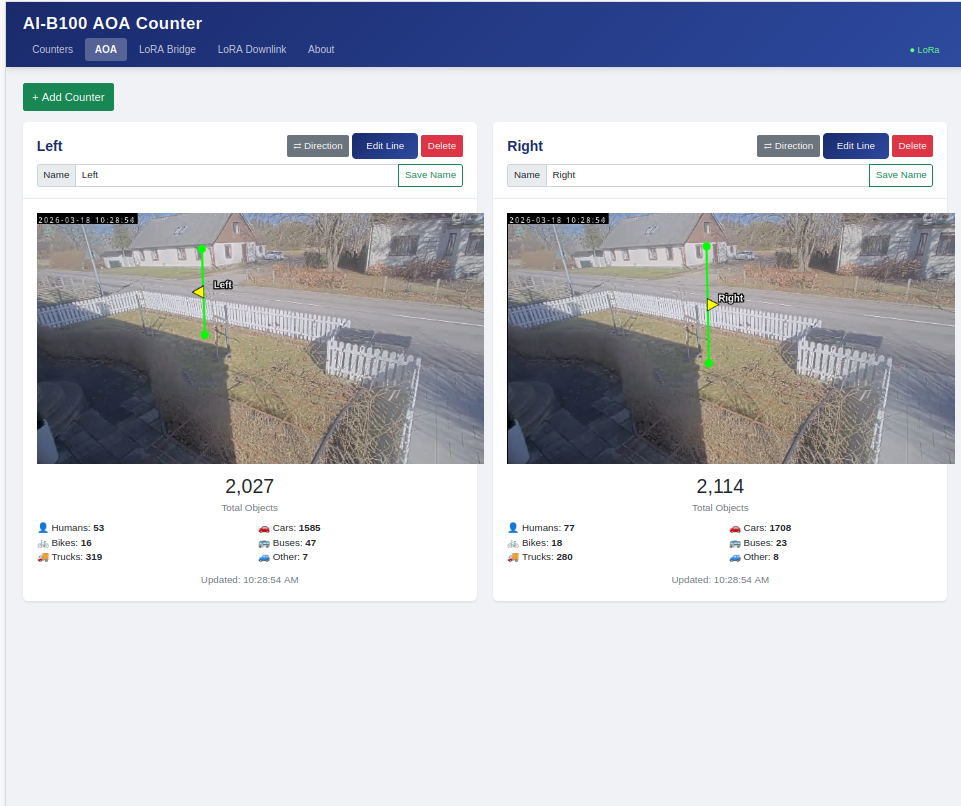
Configure the counting line position and choose which object classes to track. The ACAP will subscribe to these events automatically — no additional configuration needed on the AOA side once the scenario is active.
Configuring the AI-B100
Access the AI-B100 web interface from your browser on the local LAN.
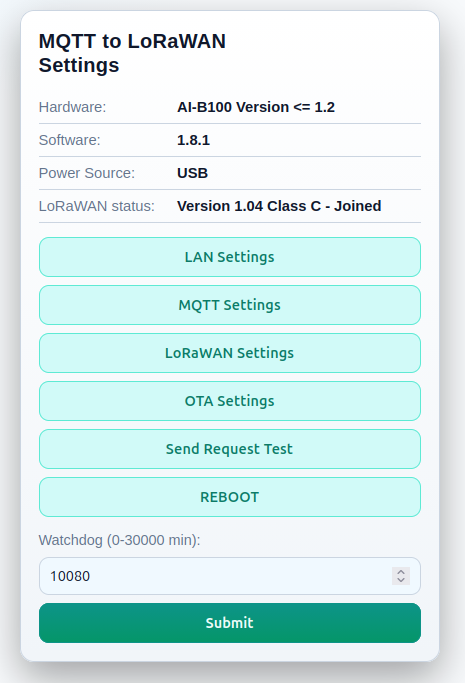
Key configuration steps:
- LAN Settings — assign a static IP or confirm DHCP address
- MQTT Settings — the ACAP publishes to the AI-B100’s built-in MQTT broker on the local network; confirm the broker address matches what you’ve set in the ACAP
- LoRaWAN Settings — enter your DevEUI, AppEUI, and AppKey from your LoRaWAN network server provisioning
- Verify join — the status panel shows
LoRaWAN 1.04 Class C - Joinedwhen the device has successfully connected to the network
The AI-B100 supports Class C operation, meaning the network server can send downlink commands to the device within seconds — useful for remotely resetting counters or changing configuration.
LoRaWAN Network Server Setup
Provision the AI-B100 on your network server of choice (TTN, Chirpstack, or a private server):
- Register the device using the DevEUI printed on the AI-B100
- Set the payload format/codec — use the JavaScript decoder downloaded from the ACAP settings page
- Configure uplink routing to your backend (MQTT, HTTP webhook, or direct integration)
The payload decoder translates the compact binary uplink into structured JSON with named fields for each object class and direction, ready for storage in InfluxDB, forwarding to a city IoT platform, or processing in Node-RED.
Deployment Considerations
LoRaWAN duty cycle — EU868 limits devices to approximately 1% air time. With compact binary payloads, a 15-minute publish interval comfortably stays within this budget. Do not set intervals shorter than 10 minutes in production.
RF coverage — verify gateway coverage at the installation site before finalising the mount. The AI-B100-ANT variant with an external antenna is useful for challenging locations (metal enclosures, basements, dense urban environments).
Privacy — the system transmits only integer counts. No images, no video, no personal data. GDPR compliance is built into the architecture.
Offline operation — the camera, AI-B100, PoE switch, and LoRaWAN gateway form a self-contained system. No internet access is required at the site.
Optional: Visualising Data with Node-RED and Grafana
Once uplinks arrive at your network server, a straightforward pipeline using Node-RED, InfluxDB, and Grafana gives you live dashboards and historical trend analysis. The JavaScript decoder from the ACAP makes it simple to parse payloads in a Node-RED function node and write the counts to InfluxDB time-series fields.
