SVG Overlay: Draw Anything on Your Camera Stream
Sometimes the most useful camera feature is one that lets you add your own visual layer — a bounding box from a detection algorithm, a zone boundary, a text annotation, an arrow pointing to something specific. SVG Overlay is an ACAP that does exactly that: it renders a transparent SVG graphic directly on top of the live video stream, driven by any system that can send an HTTP request or publish an MQTT message.
How It Works
The ACAP exposes an HTTP endpoint on the camera. You POST an SVG document to it, and the overlay appears on the stream immediately. Send a new SVG and it replaces the old one atomically. Send an empty body or issue a DELETE and the overlay is gone.
The coordinate space is always viewBox="0 0 1000 1000" — the camera maps this onto the actual stream resolution and handles all physical rotations (0°/90°/180°/270°) automatically. You never need to know whether the camera is running at 720p, 1080p, or 4K.
Any client works: curl, Python, JavaScript, Node-RED, a custom application. If it can make an HTTP request, it can drive the overlay.
What You Can Draw
Any standard SVG element is supported:
<rect>— bounding boxes, zones, regions of interest<circle>,<ellipse>— radial markers, detection dots<line>,<polyline>,<polygon>— tripwires, perimeter outlines<path>— arrows, custom shapes<text>— labels, confidence scores, class names<g>— grouped elements with transforms
Fill, stroke, opacity, dashed lines, text anchors, font families — the full set of standard SVG presentation attributes works.
Quick Example
Draw a red bounding box with a label using curl:
curl -u root:PASSWORD -X POST \
  http://CAMERA-IP/local/svgoverlay/draw \
  -H 'Content-Type: image/svg+xml' \
  -d '<svg xmlns="http://www.w3.org/2000/svg" viewBox="0 0 1000 1000">
  <rect x="200" y="300" width="250" height="350"
        fill="rgba(255,0,0,0.15)" stroke="#ff0000" stroke-width="4"/>
  <text x="202" y="293" fill="#ff0000" font-size="34" font-family="sans-serif">Person 94%</text>
</svg>'
Clear it again:
curl -u root:PASSWORD -X DELETE http://CAMERA-IP/local/svgoverlay/draw
MQTT Support
If you prefer event-driven messaging, configure a broker in the app’s MQTT settings. The ACAP then subscribes to:
| Topic | Action |
|---|---|
svgoverlay/{serial}/draw |
Set overlay (SVG payload) |
svgoverlay/{serial}/clear |
Clear overlay |
Publish an SVG string to the draw topic and the overlay updates instantly. Useful when your detections already flow over MQTT and you want to close the loop without adding HTTP calls.
Built-in Draw Tool
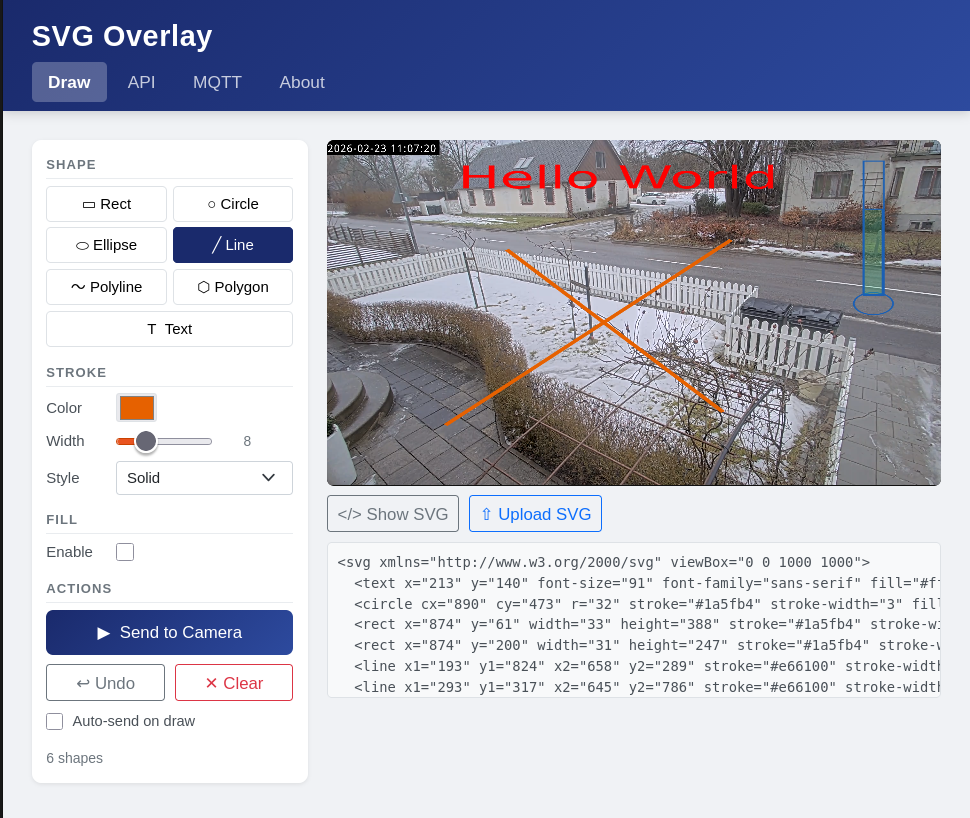
The app includes a Draw page where you can design overlays interactively in the browser — directly on top of the live video. Pick a shape tool (rectangle, circle, line, text, polygon, arrow), set colours and stroke width, draw on the canvas, and hit Send. The raw SVG is displayed below the canvas so you can copy it straight into your own code.
The API page documents every endpoint with curl, Python, JavaScript, and Node-RED examples, each with a ▶ Try on camera button that sends the example to the live stream immediately.
Integration Ideas
- Pair with a detection ACAP or an external model to visualise bounding boxes in real time
- Use Node-RED to subscribe to detection events and re-draw the overlay on every frame
- Mark fixed zones or measurement regions without modifying the camera’s built-in overlay configuration
- Annotate streams from a central system across a fleet of cameras — each camera has its own endpoint
Install
Download the ZIP, unpack it, and install the .eap for your camera architecture via the camera’s web interface under Apps:
| File | Architecture |
|---|---|
SVG_Overlay_2_0_0_aarch64.eap |
64-bit cameras (most current models) |
SVG_Overlay_2_0_0_armv7hf.eap |
32-bit cameras (older models) |
Note: the overlay is visible in the live stream only — it does not appear in still image snapshots.
